3 signs your business has outgrown its systems
A business rarely outgrows its systems in one dramatic moment. Nothing breaks; work just gets harder. Three signs usually show up first, and what to do when you see them.
A business rarely outgrows its systems in one dramatic moment. Nothing crashes and nobody resigns over it. Work just gets a little harder every month: a question takes longer to answer, a task needs one more person to sign it off, and the tools that were fine for five people start to feel like furniture you walk around.
Because it happens slowly, it is easy to miss. These three signs usually show up first.
1. Critical work depends on complicated spreadsheets
Spreadsheets are a good way to start. They are flexible, everybody has one, and nobody needs permission to make a new column. The trouble starts when a spreadsheet stops being a tool and becomes the system: the price list, the stock count, the bookings, the payroll check.
You can tell it has happened when:
- there are several copies, and nobody is quite sure which one is current (Prices v7, Stock FINAL, Stock FINAL (2));
- only one person really understands how it works, and things wait when they are away;
- two people can't work on it at the same time without one of them losing their changes.
None of these is a spreadsheet's fault. A spreadsheet has no idea who may change which cell, which row needs approving, or that the same customer is typed slightly differently on three tabs. That was fine when one person kept it. It isn't when the business depends on it.
2. Managers can't see what's happening
The second sign is a question that used to be easy and isn't any more: where do we stand today?
How many bookings, how many open orders, which payments failed, which requests are waiting and for whom. In a small business the owner simply knows. As the business grows, the answer spreads out over people, inboxes and files, and finding it means asking around and then waiting.
The cost is not only the time spent asking. Decisions get made on last week's numbers, or on whoever answered first, and problems are found when a customer mentions them rather than when they start.
3. Teams create workarounds
The third sign is the most telling, because it is your team quietly telling you the tools no longer fit the work:
- a side spreadsheet, because the system has no field for something the team needs to record;
- approvals in a chat group, because the system has no step for them;
- notes stuck to a monitor, because otherwise nobody would remember.
Each workaround is sensible on its own. Together they mean the real process lives outside the system, where nobody can see it, report on it or hand it over when somebody leaves.
What it means, and what it doesn't
None of this means your team is doing it wrong. It means the business has grown and its tools haven't. Before buying anything, it is worth writing down three things:
- Which piece of work hurts most. Pick one: the process people complain about, or the spreadsheet everybody is afraid to touch.
- Who does it, step by step. Who asks, who approves, who needs to know, and what they need to see when they do.
- What you would want to see at a glance. The handful of numbers a manager would check every morning if they didn't have to ask for them.
That list is useful whatever you decide next: a packaged product, a custom build, or a platform. It is also the best way to tell whether a tool fits your business or only a demonstration.
Where Parsware fits
Parsware is an app platform for exactly this kind of work: turning a process that lives in spreadsheets and messages into an application shaped around your own operation. Its tables hold the data, forms ask for exactly the fields you need, processes carry the approval steps and send each one to the right person, and reports are drawn on a canvas. AI is built into the designers, so a first draft can start from a sentence, and we build custom mobile apps for iOS and Android when the work belongs in people's pockets.
Here is the second sign answered in our Sports & Leisure sample application, which runs a fictional leisure business with three sites (sample data, not a customer). Its Today page puts the day's bookings, classes, attendance, memberships, failed payments and takings on one screen, so nobody has to ask:
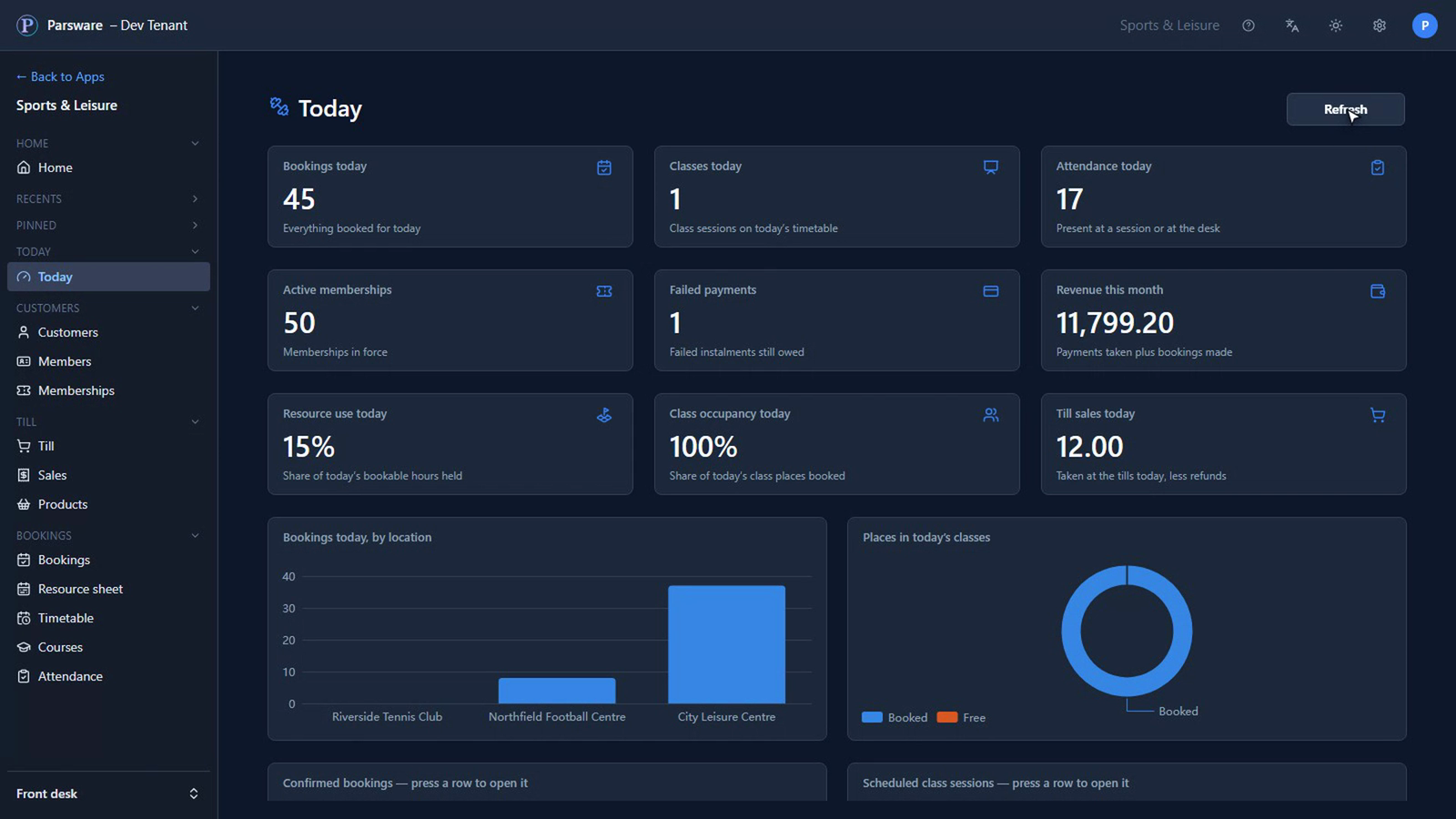
How that page is built, and the reports behind it, is in Know how today is going, before you ask. The whole sample is introduced in Three sites. One system.
Which of the three signs sounds most familiar? If your business has a problem nobody has solved yet, tell us about it.