Parsware Platform
Schemas: every artifact is a file
Every table, view, form, query, report and process you build in Parsware is a plain JSON document underneath, and every kind has a published schema. So a document can be written in an editor, by a script or by an AI assistant, checked before it's sent, and the platform checks it again the same way the designer's own are. We wrote a saved query by hand.
Everything you build in Parsware, a table, a view, a form, a query, a report, a process, an app, is a plain JSON document underneath. The designers draw it and write it for you, but it's never a picture only the designer understands. Each kind of document has a published schema that says exactly what a valid one looks like.
That has three consequences worth knowing:
- A document can be written outside the designer: in an editor, by a script, or by an AI assistant that's been handed the schema.
- It can be checked before it's sent, with any JSON Schema tool.
- The platform checks it the same way whoever wrote it. There's no shortcut for the designer and no back door for a file: a save and a solution import both go through the same check.
See the file
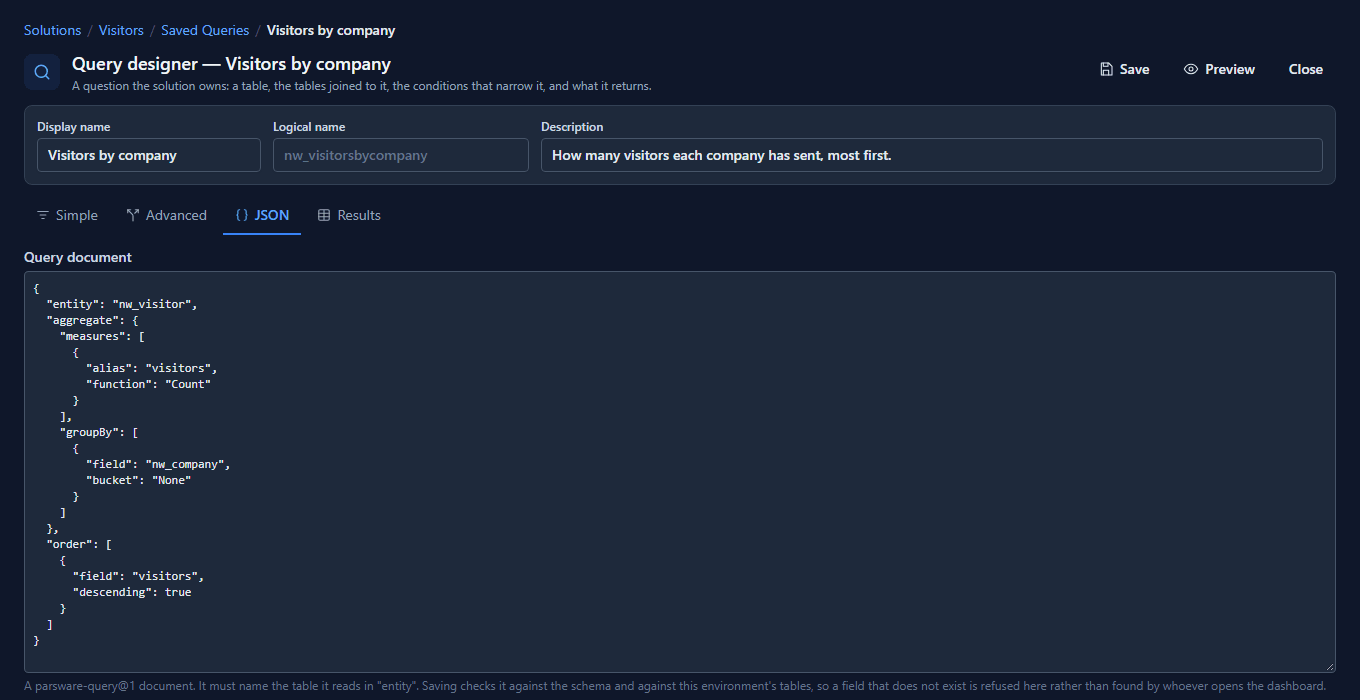
Open a saved query, Visitors by company in the Visitors solution, and switch to its JSON tab. The designer's drawing is this document:
Where the schemas are
The developer help publishes every schema, 31 of them, each at /schemas/<name>.schema.json: a
table is model-driven-entity, a view model-driven-view, a query parsware-query, a saved
query saved-query, a report model-driven-report, a process bpms-process, a whole solution
solution-package. The Artifact Schemas page lists them all.
Write one by hand
Reception wants a second question next to the first: how many visitors came for each purpose. Here it is, written in an editor:
{
  "logicalName": "nw_visitorsbypurpose",
  "displayName": "Visitors by purpose",
  "publisherPrefix": "nw",
  "description": "How many visitors came for each purpose, most first.",
  "query": {
    "entity": "nw_visitor",
    "aggregate": {
      "groupBy": [{ "field": "new_purpose" }],
      "measures": [{ "alias": "visitors", "function": "Count" }]
    },
    "order": [{ "field": "visitors", "descending": true }]
  }
}
The outside is a saved query; the query inside is a query document, with its own schema. Check
each against its own, as the platform does:
$ npx ajv-cli validate --spec=draft2020 -s saved-query.schema.json -d visitors-by-purpose.json
visitors-by-purpose.json valid
$ npx ajv-cli validate --spec=draft2020 -s parsware-query.schema.json -d query.json
query.json valid
Send it
In the Visitors solution, open Saved Queries, then New. The name, logical name and
description boxes hold the outside of the file; paste the query part into the JSON tab and
Save. Preview runs it:
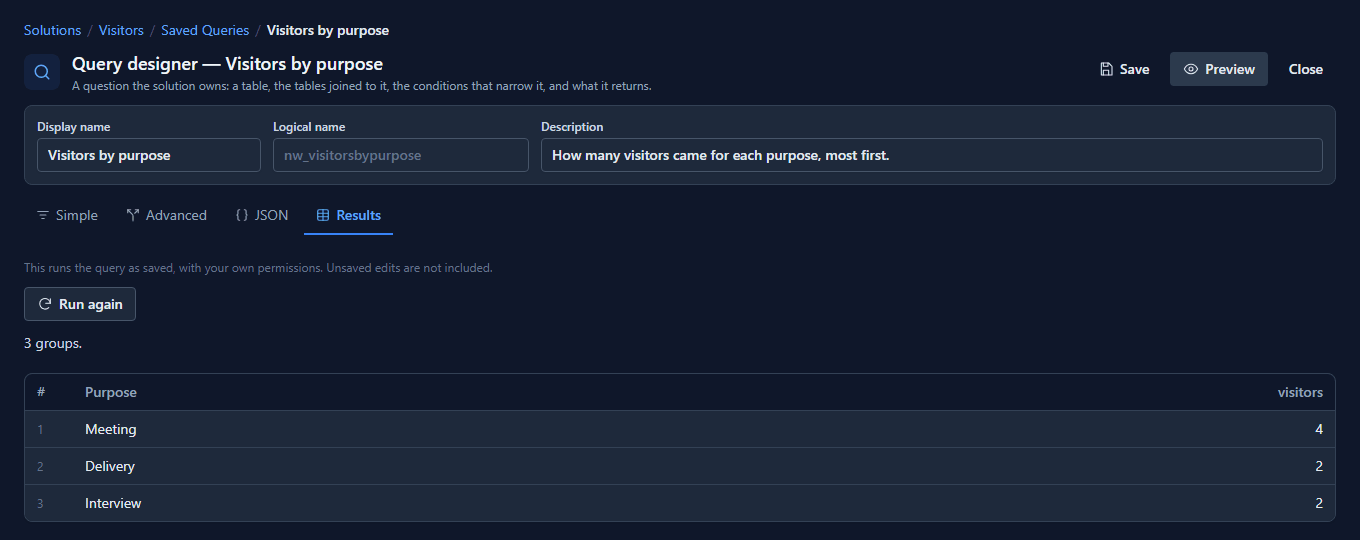
It's now a saved query like the one the designer drew. Its Simple and Advanced tabs show it as a drawing, and an app or a report can run it by name.
When it's wrong
Write "Total" where the schema says a measure's function is one of Count, Sum, Avg,
Min or Max, and Save refuses it, saying where:
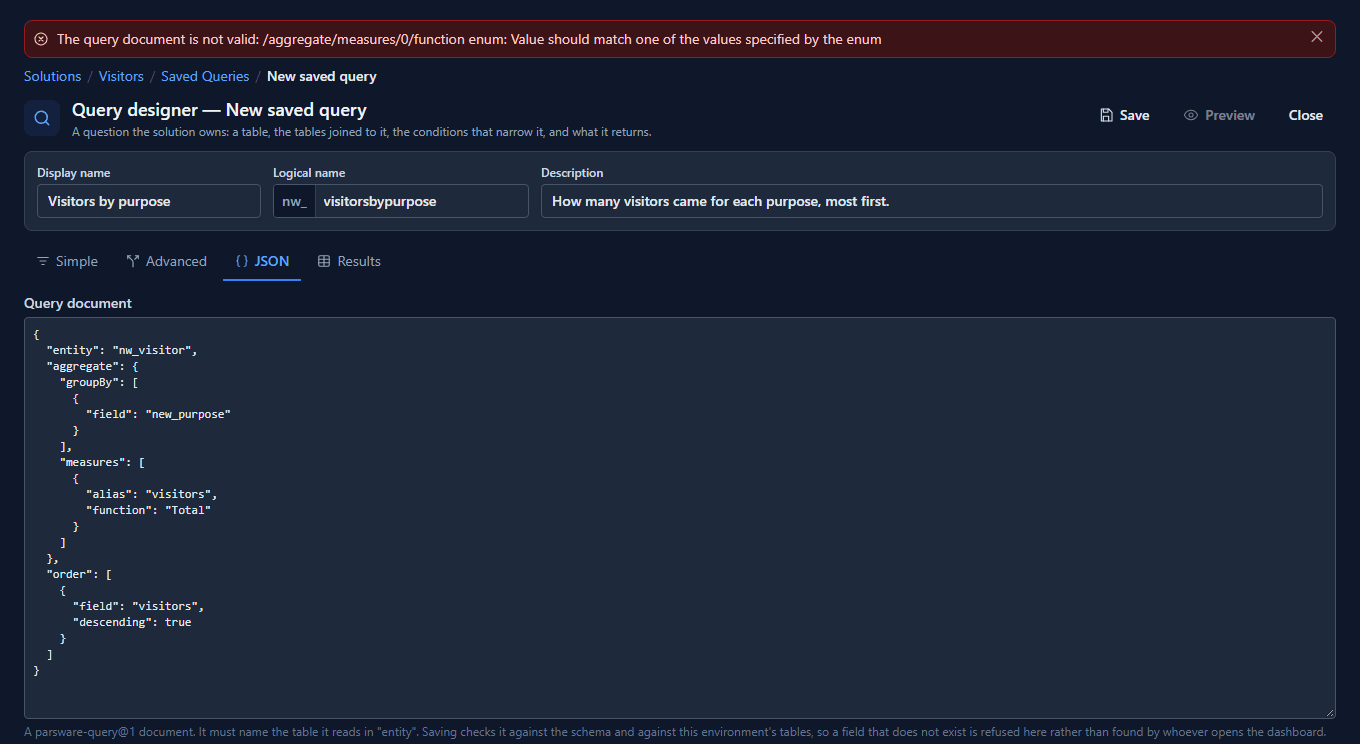
The path, /aggregate/measures/0/function, is the same one ajv would have named. A misspelt
property is refused the same way: "ordr" comes back as /ordr is not allowed here: the
schema does not name it. A field that's spelled right but doesn't exist on the table gets past
the schema and is caught next, when the query is checked against Visitors itself.
Solutions are files too
A solution package is the same idea one level up: a solution-package document carrying every
component's document. Importing one checks the package against its schema and then each
component against its own, so a solution generated by a script is checked exactly like one
exported from Development.
What we fixed
- Saving didn't check what you wrote. The designer's Save read the query into the platform's
own shape first and checked the schema after. By then a property the schema doesn't name had
been dropped, so
"ordr"saved without a word, and an unknownfunctionfailed with One or more validation errors occurred, which says nothing. Save now checks the text you sent, and so does importing a solution. - A refused property was described, not named. The platform's message for a property the schema doesn't have was All values fail against the false schema. It now says the property is not allowed here: the schema does not name it, everywhere a document is checked.
- A total grouped by a choice showed numbers. Visitors by purpose previewed as
270150000,270150001, while the same column read Meeting in a list. Grouped results now carry the option's label, in the designer, in charts and reports, and for an app. - The schemas page listed nothing. The developer help's Artifact Schemas page still said the section was "intentionally empty" while the site served 31 schemas, 18 of which weren't linked from anywhere. It now lists every one, says how to check a document against it, and that a document holding another, like a saved query's query, is checked against both. In all seven languages.
Good to know
- A schema is a contract, not a suggestion. A property the schema doesn't name is refused, not ignored, so a typo in a property name is caught rather than silently lost.
- Old shapes stay valid where they must. When a document's shape changes in a way old files can't meet, the old schema is kept beside the new one so a solution exported before the change still imports.
- The published copies are the platform's own. A test fails the build when a published schema differs from the one its service validates with.
Try it
Pick a view you use, open its JSON, and find each part of it in the model-driven-view schema.
Then write a saved query of your own in an editor, check it with ajv, and paste it in.
Next: Build a custom React app.