Parsware Platform
Connecting Parsware to your other systems
Every business application ends up talking to something else: an accounting package calls in, a payment provider gets called out to, files go somewhere other people can fetch them. This is the map of how Parsware does each of those, and of the series that walks through them one at a time.
No application lives alone. A warehouse system wants to read your orders. Your orders need a payment provider. A partner wants a receipt they can print. Somebody in finance wants last month's export as a file. Each of these is a connection between Parsware and another system, and each goes one of three ways:
| Direction | Example | What you use |
|---|---|---|
| In: another system calls Parsware | an accounting package asks for an invoice | a Custom API, called with the credentials of an app registration |
| Out: Parsware calls another system | a plugin step takes a payment, sends an email | callService and sendEmail, pointed by environment variables |
| Files: something to fetch later | a nightly export, a scanned contract | object storage, or a file on the record itself |
The rest of this article is a short tour of each, and where the series goes deeper.
In: a Custom API is a contract
Parsware already has an API for your tables, generated from their definitions. It changes shape whenever a table does, which is right inside the platform and wrong for somebody outside it: they wrote their code against one shape and won't rewrite it because you renamed a column.
A Custom API is the promise that a route keeps its shape while the tables behind it move. You choose the method and the route, the scope a caller must hold, and what it answers with: JSON, text or an HTML page. Its behaviour is a BS Lang script, and it travels in your solution like a form or a view:
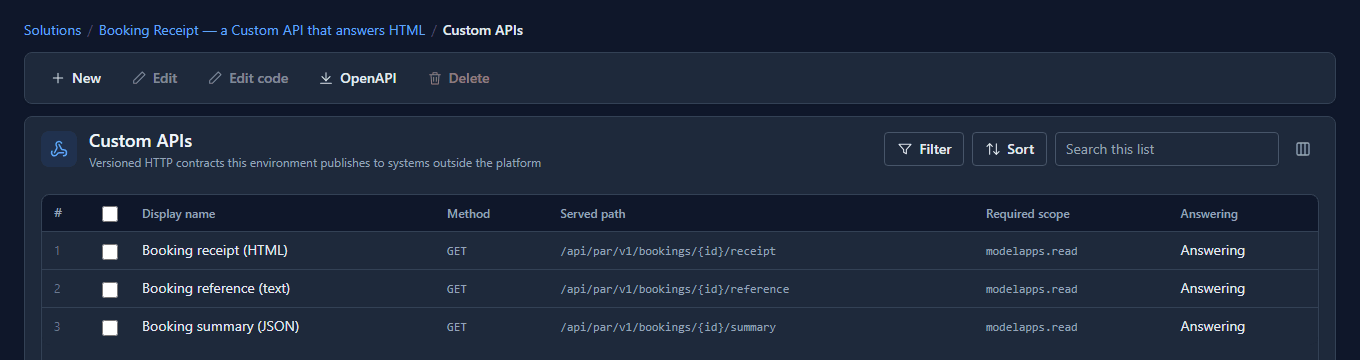
Two things make it safe to hand out:
- It has a version. v1 and v2 of the same API answer side by side, so you can change a shape without breaking whoever still calls the old one.
- It never widens access. Reading or writing a record from its script goes through the same permission checks as the platform's own screens. A Custom API gives a caller a stable view of your data, never a larger one.
OpenAPI on the toolbar copies a description of every contract, generated from their definitions, ready to hand to whoever is integrating.
Who is calling: app registrations
A system calling you isn't a person, so it doesn't sign in. An administrator registers it under App registrations and gives it exactly what it needs:
- Scopes: what kind of call it may make at all, such as reading or writing app data.
- Security roles: which records its calls may reach. None is the safe default: the application may call, and touches no record.
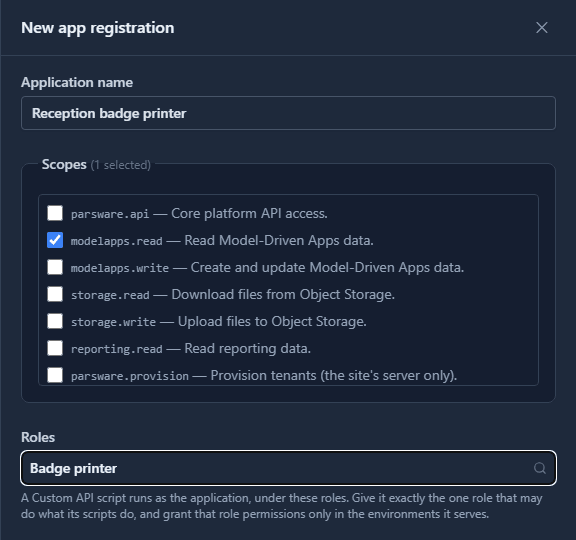
Registering gives it a client id and a client secret, shown once. The system trades them for a short-lived access token and sends that token with every call. Revoke the registration and it can't get another one.
Out: name a service, not an address
The other direction is a script calling out. A plugin step that takes a payment calls
callService('par_payment_service', …); one that confirms an order calls
sendEmail('par_mail_service', …). Neither contains an address. Each names an environment
variable, and each environment says where it points:
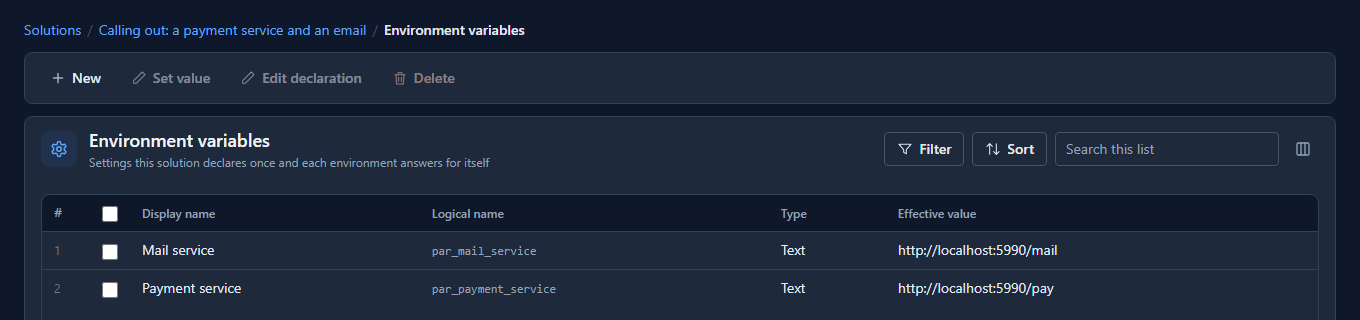
That is the whole security design. A function that took a URL would give every script an open door to anywhere, the platform's own internal network included. A name gives a script exactly the services an administrator pointed somewhere, and an environment that configured nothing reaches nothing. It's also what lets Test pay through a sandbox while Production pays for real, from the same solution.
Files: object storage
Some things are files, and big ones: a month's export, a batch of scanned contracts, a file one
system leaves for another. Those go into object storage: buckets and keys, like exports/2026/ledger.csv,
with a Storage screen for administrators to see what's there.
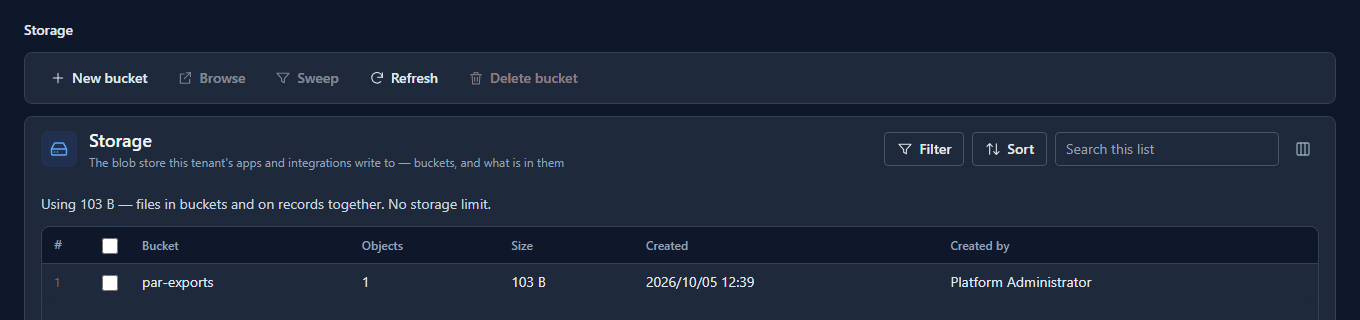
A script writes to it, and a Custom API can hand a file out. One thing it is not for: a file that belongs to one record, like a contact's photo or a signed form. That lives on the record, in a File or Image field, and is served only to people who may read the record.
What we fixed
The Storage screen's Created by column showed the creator's user id, a string of letters and numbers nobody can read. It now shows their name, the way the audit log does.
Which one?
- Another system needs your data, or needs you to do something: a Custom API, and an app registration for the caller.
- Your logic needs another system:
callServiceorsendEmail, with an environment variable for each service. - Something is a file to keep or hand over: object storage. A file about one record: a File field on it.
What this series covers
- Connecting Parsware to your other systems (this one).
- Publish a Custom API: the contract, its script, and the OpenAPI description.
- An HTML receipt from a Custom API.
- A printable invoice from a Custom API.
- Register an external app.
- Get an access token.
- Export files to object storage.
- Query platform data for reporting.
- Schemas: every artifact is a file.
Calling out has its own articles already: Call an outside service, Send an email from a script and Environment variables across environments.
Try it
Import the Booking Receipt sample (samples/solutions/custom-api-html-receipt), open its
Custom APIs, and press OpenAPI. Paste what it copies into any OpenAPI viewer: that's the
document you'd hand a partner.
Next: Publish a Custom API.