Parsware Platform
An HTML receipt from a Custom API
A Custom API doesn't have to answer JSON. Declare HTML and its script writes a page: here, a receipt for one booking that another system can drop into a confirmation email or open in a browser. And because the page is built from what a guest typed, every value goes through htmlEncode on its way in.
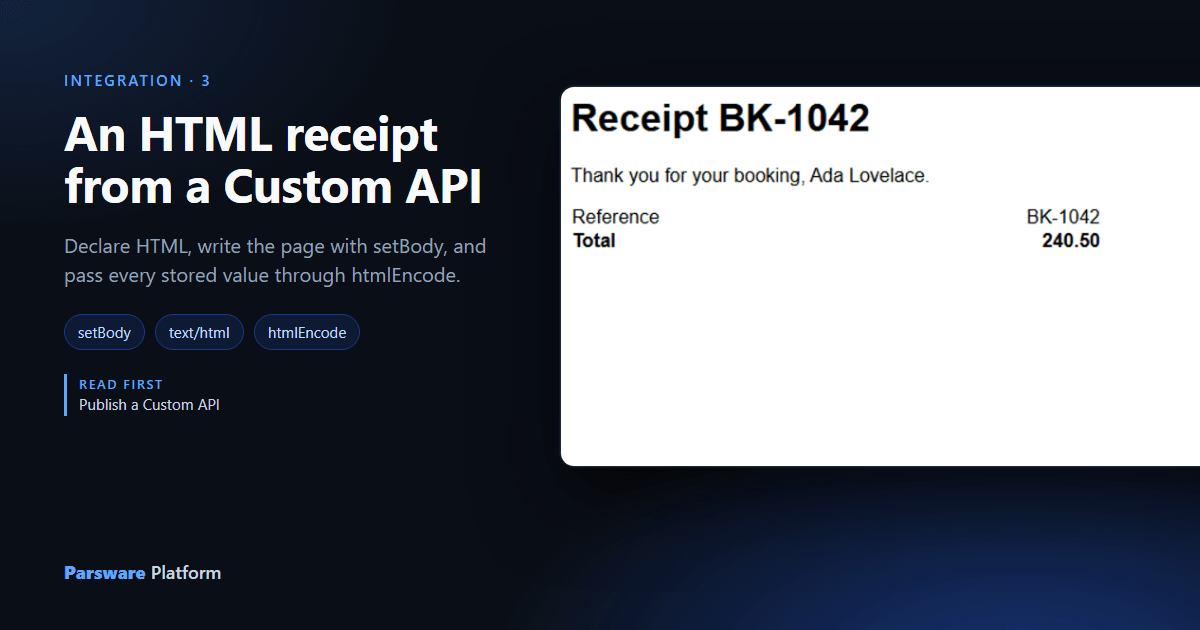
Your booking system sends confirmation emails, and it would like Parsware to write the receipt in them. It doesn't want data to lay out; it wants the finished page. A Custom API can answer exactly that: declare that it answers HTML, and the script writes the page.
We used the Booking Receipt sample, samples/solutions/custom-api-html-receipt. It has a
Booking table, an app to create bookings in, and three contracts over that one table, one for
each thing a Custom API can answer.
Three contracts, three answers
Open the solution's Custom APIs:
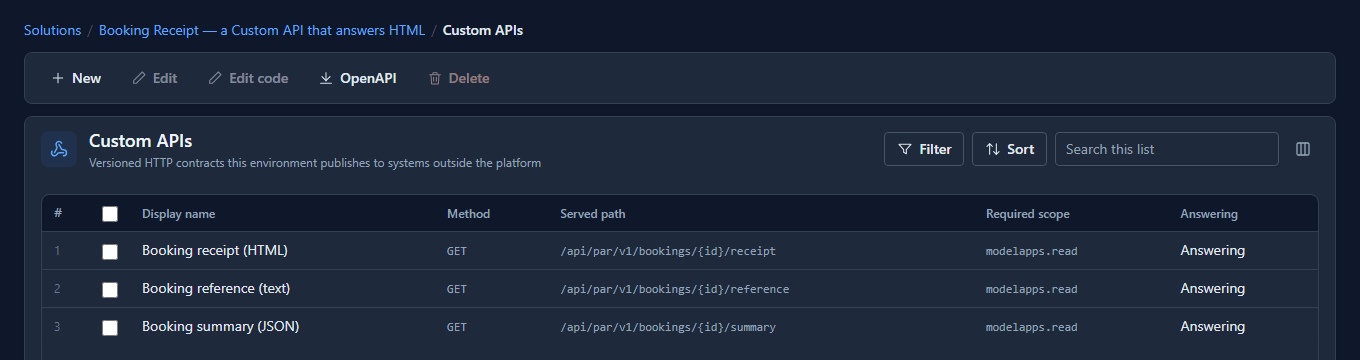
| Contract | Answers with | The script writes |
|---|---|---|
| Booking summary | JSON | setOutput('reference', …), once per field |
| Booking reference | Text | setBody('BOOKING-…'), one line |
| Booking receipt | HTML | setBody('<article>…</article>'), a page |
Answers with is on the contract, not only in the code, because the OpenAPI description is
generated from the contract before anybody calls. Declare HTML and the description says
text/html, so an integrator doesn't write a JSON parser around your page.
The receipt's script
Select Booking receipt and press Edit code:
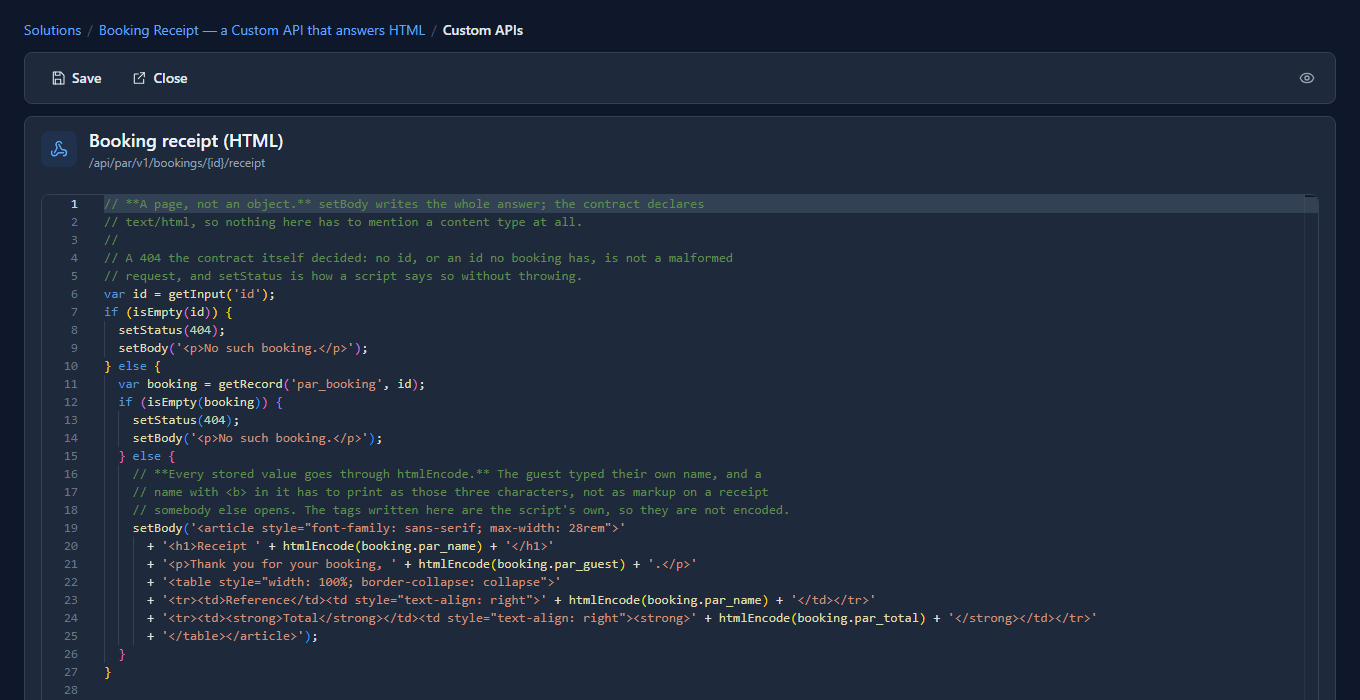
It reads the booking, and builds the page out of it:
var booking = getRecord('par_booking', id);
setBody('<article>'
  + '<h1>Receipt ' + htmlEncode(booking.par_name) + '</h1>'
  + '<p>Thank you for your booking, ' + htmlEncode(booking.par_guest) + '.</p>'
  + …
  + '</article>');
setBody writes the whole answer, exactly as given. With setOutput you'd get a JSON object with
your page inside it as a string, in quotes. A script uses one or the other, never both: a script
calling both is refused rather than one quietly winning.
Calling it
We created a booking: BK-1042, guest Ada Lovelace, total 240.50. The booking system is
registered under App Registrations with the modelapps.read scope and a role that may read
bookings and nothing else. It calls the receipt with its token, like any Custom API:
GET /api/par/v1/bookings/8a6507bf…6a4f/receipt
Authorization: Bearer eyJhbGciOi…

200 OK
Content-Type: text/html

<article style="font-family: sans-serif; max-width: 28rem"><h1>Receipt BK-1042</h1>…
Not JSON, not a string in quotes: markup. Open it in a browser and it's a receipt:

For a booking that isn't there, the script answers 404 with its own short page, No such
booking. That's setStatus(404): the contract deciding, not the caller getting it wrong (that
would be throwValidationError, a 400).
Why every value goes through htmlEncode
A guest typed their own name. If they typed <b>Ada</b>, or something worse, a script that pasted
the name straight into the page would turn it into markup, on a receipt that somebody else opens.
So the sample passes every stored value through htmlEncode, which turns <, >, &, "
and ' into entities. We changed the guest to <b>Ada</b> and fetched the receipt again:

The tags print as text. The rule is short: your own tags go in as written; anything that came
from a record goes through htmlEncode. The same goes for an email a plugin step sends with
html: true.
What we fixed
Writing this article found two things, both fixed before it was published:
- There was no way to escape a value. BS Lang has no
replace, so a script couldn't make a stored value safe for HTML however careful its author was.htmlEncodeis new, and it works in every server-side script: Custom APIs, plugin steps, scheduled jobs and processes. - The sample's receipt didn't read the booking. It printed the id from the address and nothing
else, which made it a demonstration of
setBodyrather than a receipt. Version 1.1.0 reads the booking and prints its reference, guest and total.
Good to know
- A page, not a site. A Custom API answers one page per call. Styles go inline, as in the sample, because an email client ignores a stylesheet it would have to fetch.
- A browser can't send the token by itself. Opening the address in a browser's address bar gets a 401: the receipt is for a system to fetch and pass on, in an email or on its own site.
- Text is the third answer. Booking reference answers
BOOKING-…as plain text, for a label printer or a shell script, where JSON's quotes would get in the way.
Try it
Import the sample, create a booking in its app, and fetch its receipt. Then give the guest a name with a tag in it and fetch it again.
Next: Register an external app.