Parsware Platform
Several solutions in one environment
Two publishers' solutions can sit side by side in one environment, and one can build on the other. Parsware checks the order both ways: an import that needs a table the environment doesn't have is refused, and so is an uninstall that would take away a table another solution still uses.
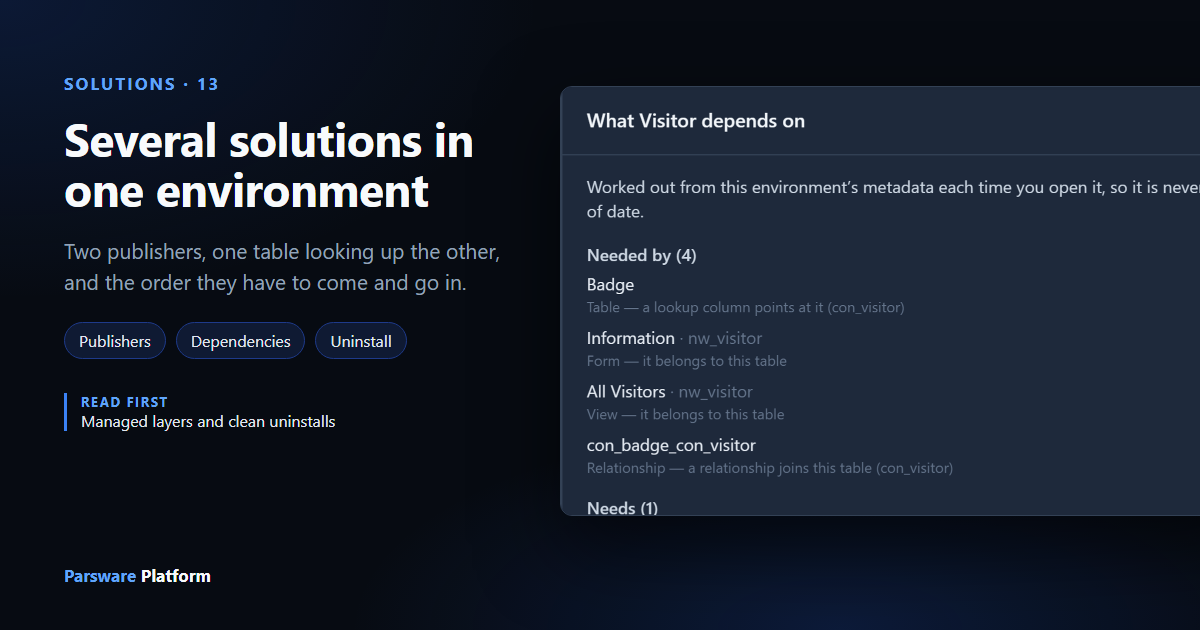
An environment rarely runs one solution. Test already has Visitors, from the Northwind Traders publisher, which we've been moving through Development, Test and Production in the last few articles. In this one a second publisher, Contoso, builds a solution on top of it: Visitor badges, a table of badges printed at reception, each for one visitor.
So there are two solutions from two publishers, and one needs the other. We look at what Parsware checks when they arrive and when they leave, and at two bugs we found and fixed on the way.
Two publishers, side by side
Every solution belongs to a publisher, and everything a publisher builds carries its prefix.
Northwind's table is nw_visitor, Contoso's is con_badge, and its columns are con_name,
con_visitor and con_validuntil. Two publishers can't collide on a name, however many
solutions they each install in the same environment.
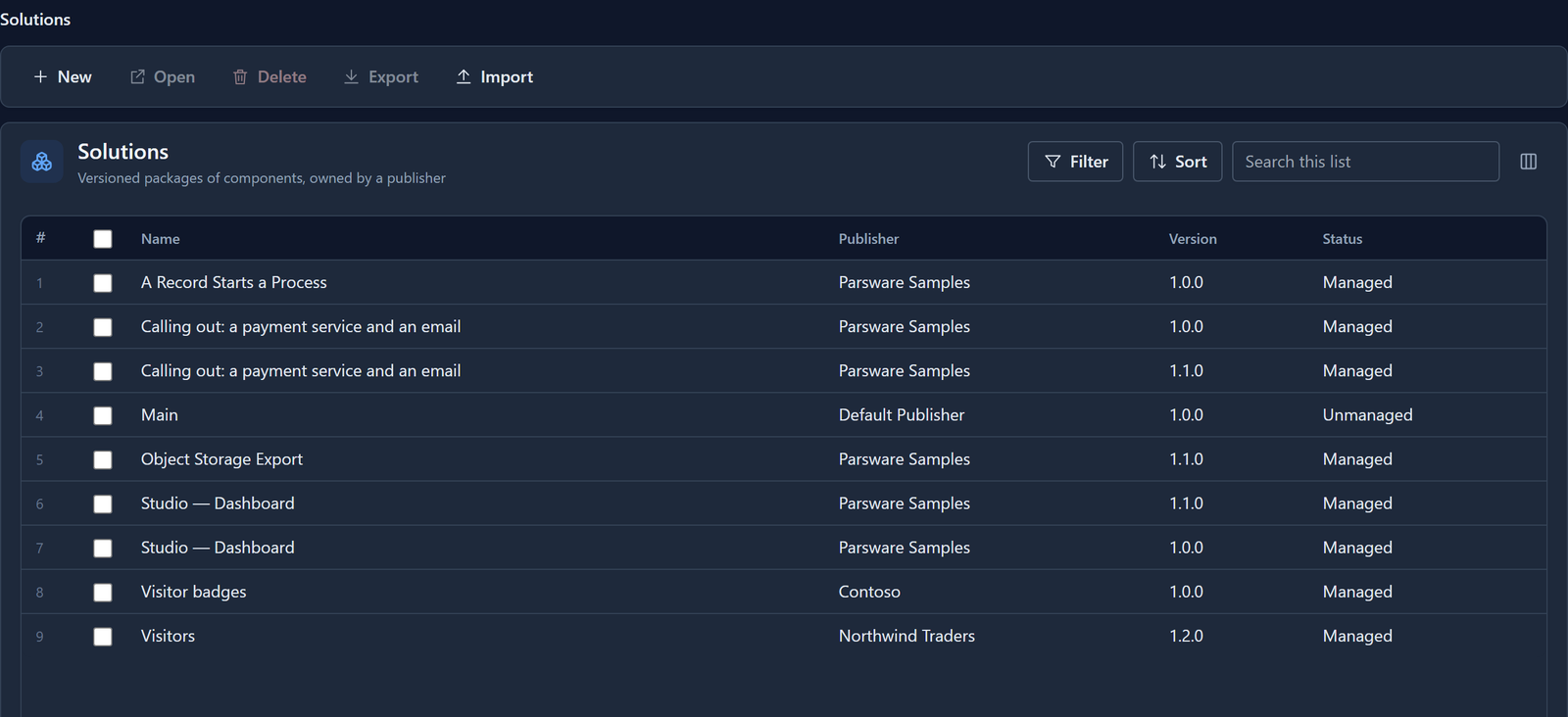
On the Solutions list, each solution shows its publisher and its version, and each is managed here on its own terms: imported, upgraded and uninstalled separately.
Building on somebody else's table
In Development, Contoso created Visitor badges and, with it open, a Badge table with a Visitor column: a lookup to Northwind's Visitor table. Select Badge on the solution's overview and choose Dependencies, and the panel says so under Needs:
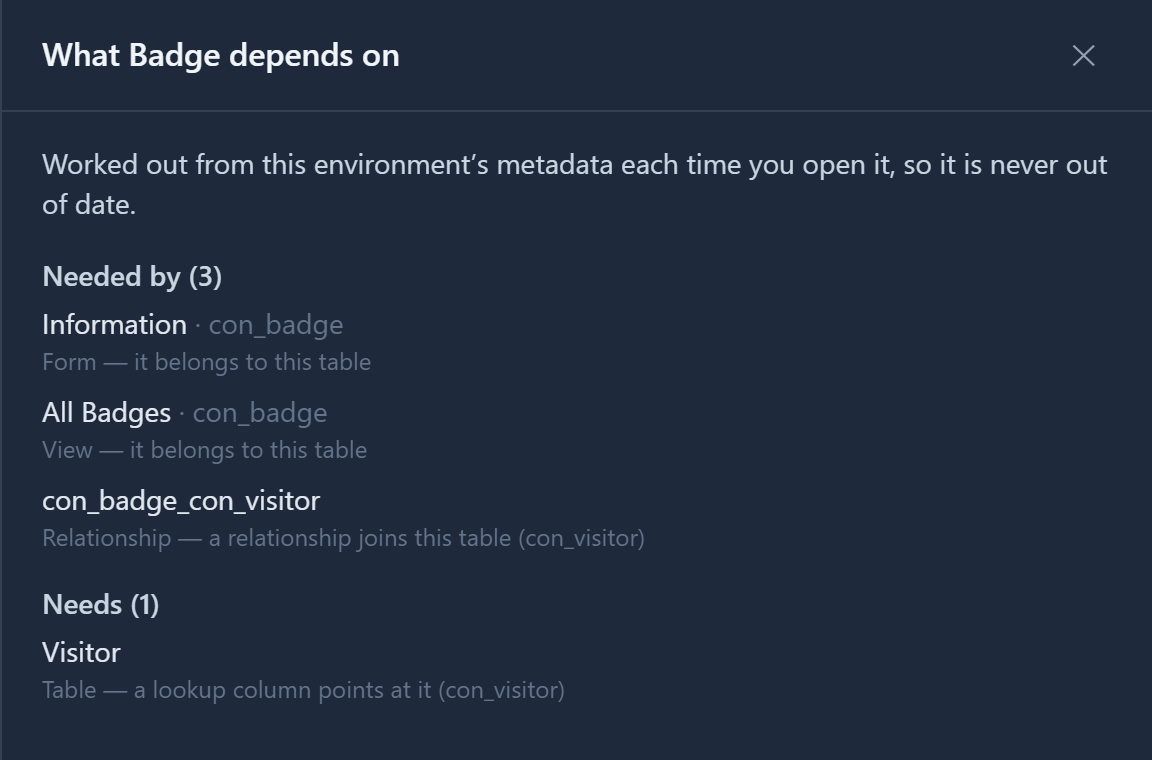
Visitor isn't in Visitor badges, and it shouldn't be. It's Northwind's table, in Northwind's
solution. Exporting Visitor badges carries Badge and nothing else. The package only says that
Badge's Visitor column looks up nw_visitor, and leaves it to the import to find that table.
Import in the right order
We imported Visitor badges into Stock, an environment that has never had Visitors:
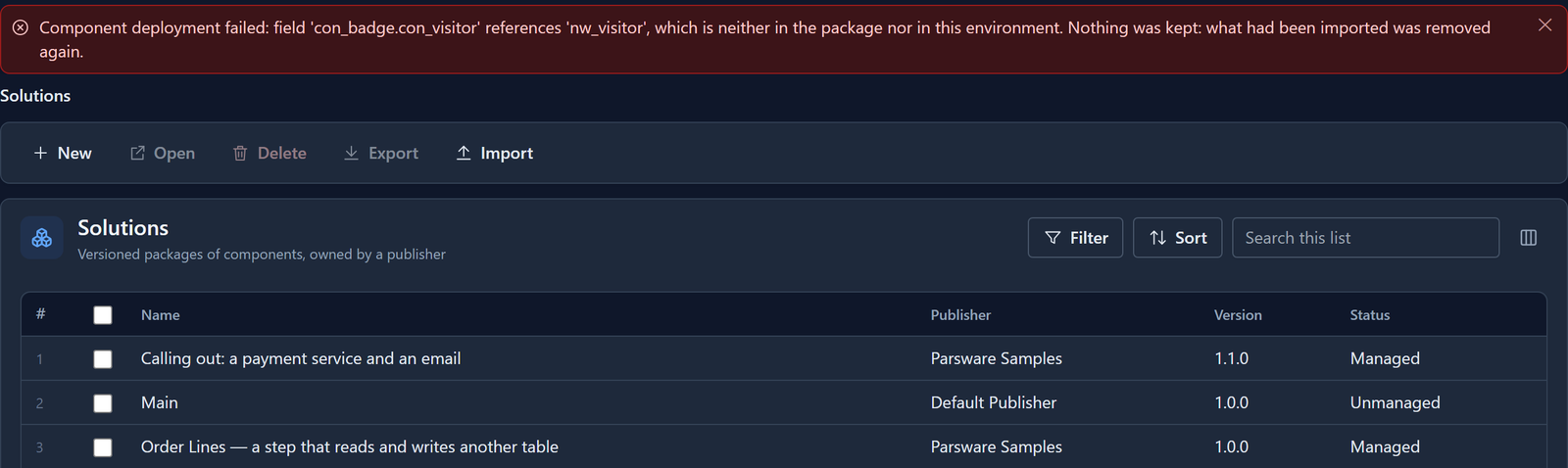
The import looked for nw_visitor in the package and in Stock, found it in neither, and stopped
before it wrote anything. The fix is the order: import Visitors into Stock first, then Visitor
badges.
This is the first bug we found. The first time we tried it, the import into Stock went through. Stock got a Badge table whose Visitor column pointed at a table that wasn't there: no link behind it, and no way to pick a visitor. Parsware already checked a column's option set this way (the previous article but one ran into that), but nothing checked a lookup's table. Now it does, for every lookup, before anything is written. The message used to say only not included in the package, which pointed at the wrong fix. It now says where Parsware looked.
A package doesn't yet record which solutions it's built on, so Parsware can't say "import Visitors first" by name. The check, column by column, is what catches the wrong order.
Into Test, where Visitors 1.2.0 is installed, the same file imported cleanly: that's the list at the top of this article.
Uninstall in the right order
In Test we added a visitor, Dana Whitfield, and a badge for her. Now open Visitors, select the Visitor table and choose Dependencies. Under Needed by, next to its own form, view and the relationship, is Contoso's Badge:
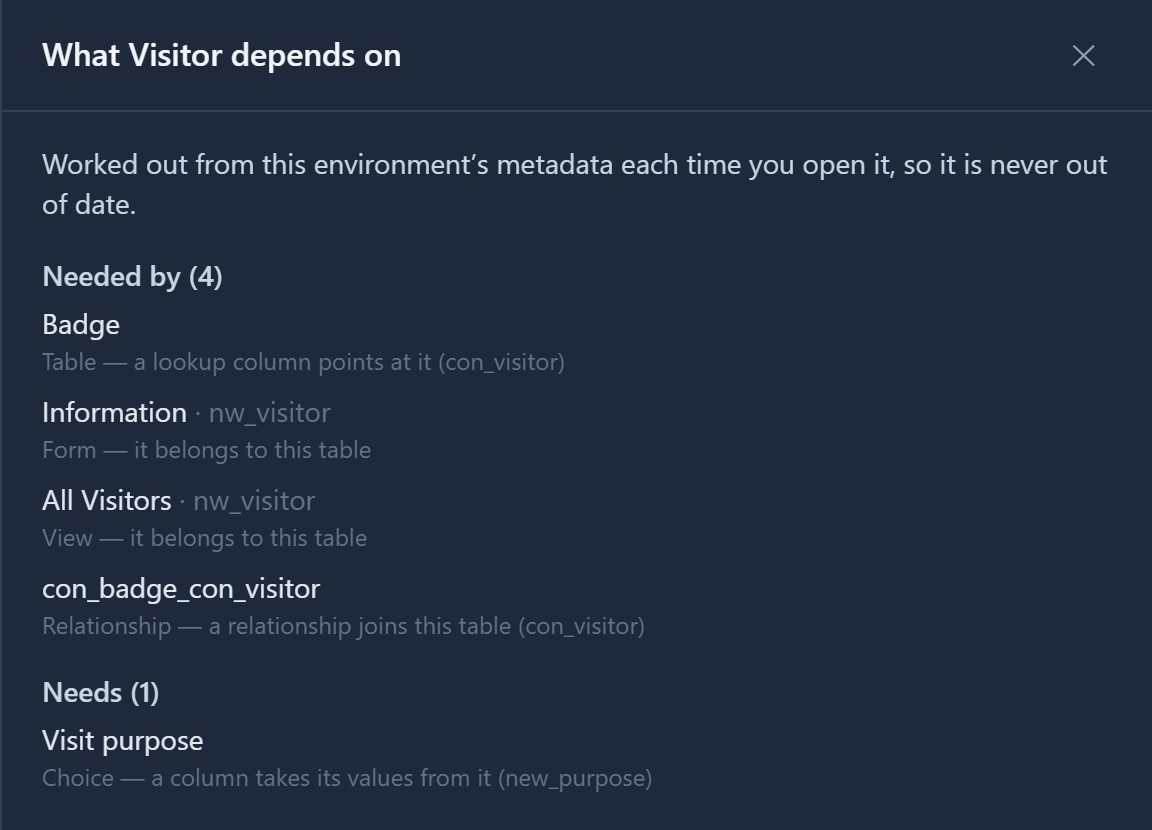
That's the warning, before you start. Uninstalling Visitors would remove the Visitor table, and Contoso's Badge table still looks it up. So the uninstall stops:
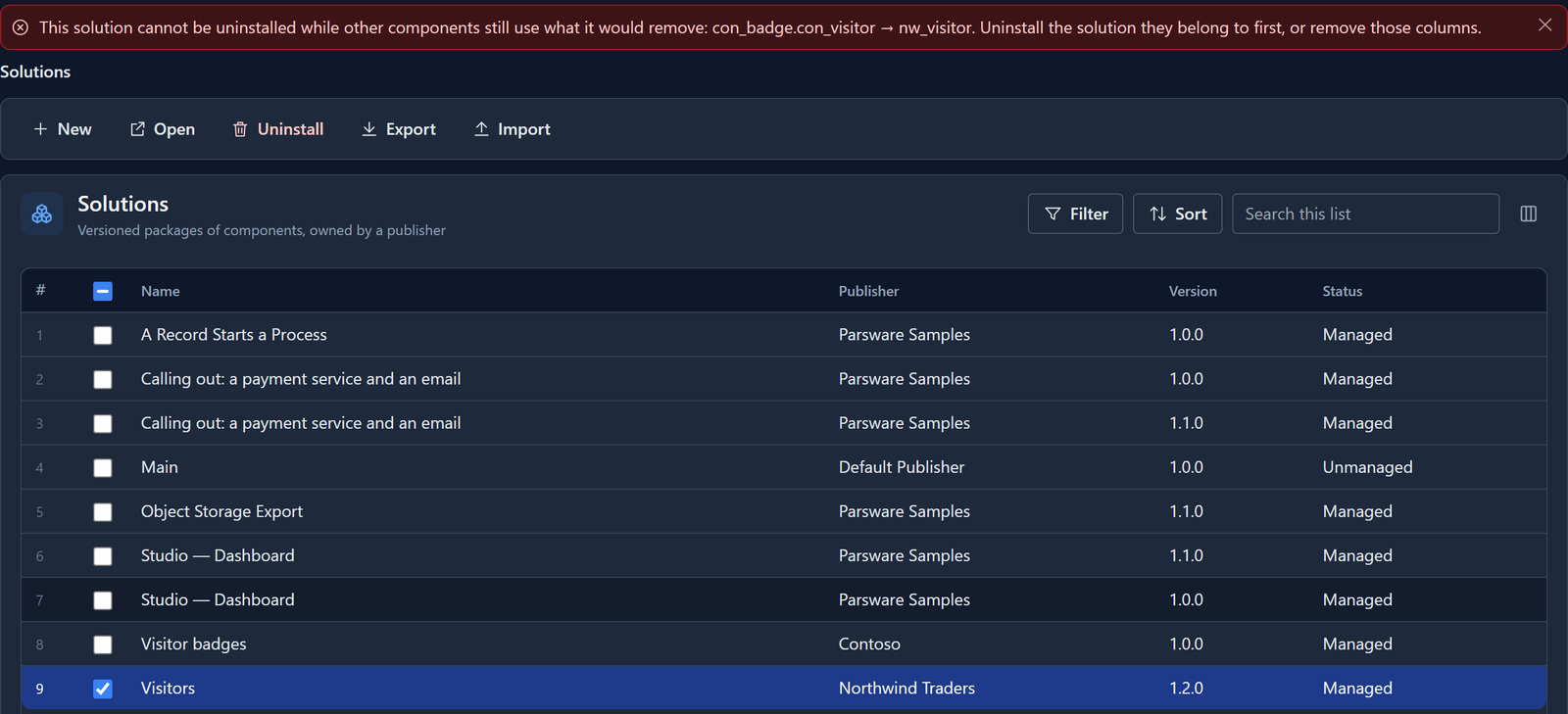
It stops before anything is removed, and names every column in the way at once. Dana and her badge are still there.
This is the second bug. Before this release, the uninstall went through. It dropped the Visitor table and Dana's record with it, and left the Badge table holding Dana's id in a column that now pointed nowhere. Uninstall was meant to check dependencies, but never did. Now it does: a lookup or a choice column on a table that stays, pointing at a table or option set that would go, stops the uninstall. A column you added yourself in Test counts the same as another solution's.
The way through is the reverse of the install: uninstall Visitor badges first, then Visitors. We checked that too: with Visitor badges gone, Visitors is free to go.
What doesn't get in the way
Only a reference to something that would disappear stops an uninstall.
- A solution that only adds columns to a table doesn't. If Contoso had added a Badge number column to Northwind's Visitor table, rather than building its own table that looks it up, Visitor would have two layers, as in the previous article. Uninstalling Visitors would leave the table with Contoso's column, so nothing points nowhere.
- A solution's own tables looking each other up don't either. They leave together.
- Two solutions adding columns to the same table both keep theirs. Uninstalling either one takes away only its own columns.
Try it
Build a solution with a table, then a second solution, under another publisher, whose table looks it up. Export both. Import the second into an environment that doesn't have the first, and read the message. Import them in order, add a record to each, then try to uninstall the first one before the second.
Next: seed data that travels with a solution.