3 things that separate a basic app from a business application
A screen with buttons is not necessarily a business application. Three things make the difference: organised information, real tasks and processes, and a way to see what is happening.
It has never been easier to make an app. A few screens, some buttons, a form that saves to a list, and it looks finished. Then it meets a real business, and the questions start: who changed this? Who approves it? How many are waiting? Where is last month's total?
Those questions are the difference between a basic app and a business application. There are three of them.
1. It works with organised business information
A basic app stores what was typed. A business application stores records: a customer, an order, a booking, each with its fields, its owner, and its links to the records it belongs to. An order knows its customer; a customer knows their orders.
That organisation is what makes everything else possible. You can't report on data that is a pile of free text, and you can't route an approval if the system does not know whose request it is.
Ask of any app: does each piece of information have one home, and does it know what it is connected to?
2. It supports real tasks and processes
Business work is rarely one step. A request is raised, checked, approved or sent back, then acted on. A basic app gives everyone the same screen and leaves the process to email. A business application carries the work from step to step, sends each step to the right person, and knows where every item is.
It also knows the rules: that an amount over a limit needs a director, that a booking cannot overlap another, that a cancelled order cannot be invoiced.
Ask of any app: when something needs a decision, does the app know who should make it, and does it tell them?
3. It helps people understand what is happening
The last difference is what comes out. A business application turns the records and the process into answers: reports, overviews, lists of what is waiting and for whom. A manager should not have to export anything to know how the week is going.
Ask of any app: can the person responsible see, at a glance, how their part of the business is doing?
Screens or a system?
A basic app is screens and buttons. A business application is your records, your process and your answers, with screens on top. Business software should support how an organisation operates, not just display screens. That is a useful test whether you are buying, building or choosing a platform.
Where Parsware fits
Parsware is an app platform for building business applications, so all three are part of it from the start. Tables hold organised information with its relationships, forms ask for the fields your work needs, processes carry the steps and approvals, and reports are drawn on a canvas. AI is built into every designer, and we build custom mobile apps for iOS and Android.
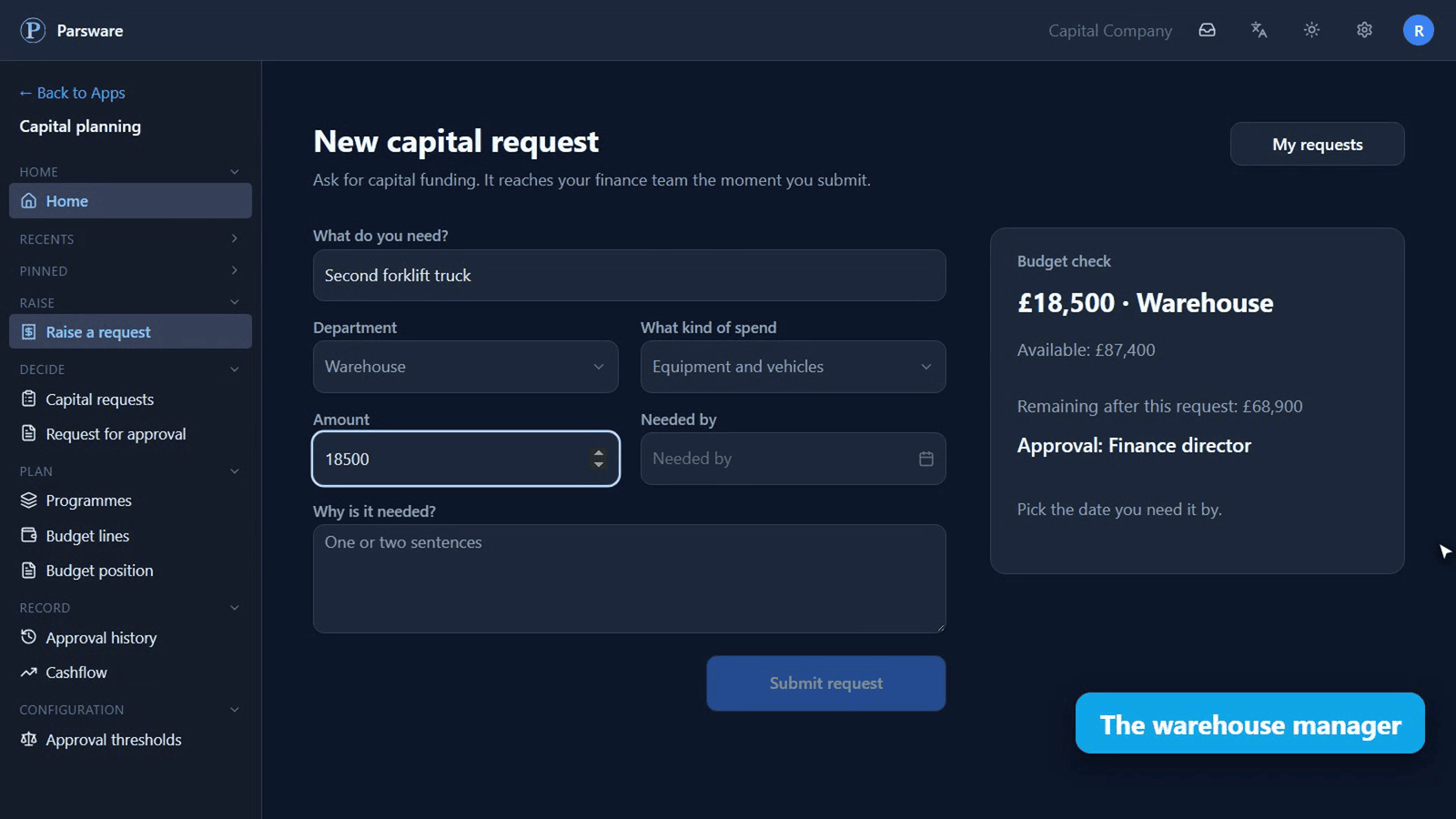
Here are all three at once in our Capital planning sample application, a fictional company's budgets and approvals (sample data, not a customer). As a manager types a capital request, the form checks the budget line it belongs to, shows what would remain, and names who will approve it:
The whole journey, from the request to the board report, is in From "can I buy this?" to the board report.
What does a useful business application mean to you? And if your business has a problem nobody has solved yet, tell us about it.