Parsware Platform
Query platform data for reporting
A reporting tool outside Parsware wants your data: which tables it may read, what their columns are, pages of rows, and totals. The reporting endpoints answer exactly that, read-only, and only what the application's role may read. We pointed the front-desk dashboard at them, and ran a saved query by name.
The front-desk dashboard from Register an external app has its token. Now it needs data: today's visitors, and how many came from each company. Other reporting tools ask the same of any system: what can I read, what does it look like, give me pages of it, and give me totals. Parsware's reporting endpoints answer those four questions, read-only, for one environment at a time.
The dashboard's registration holds the reporting.read scope and the Visitor reports
role, which reads one table. Both matter, and in that order: the scope lets it use these endpoints
at all, and the role decides what they show it.
What can I read?
GET /environments/{environment}/reporting/entities

200 OK
[{ "logicalName": "nw_visitor", "displayName": "Visitor", "displayCollectionName": "Visitors" }]
One table, because the role reads one. A role that reads more would see more: the list is the role's view of the environment, not the environment.
What does it look like?
GET /environments/{environment}/reporting/entities/nw_visitor/schema

200 OK
{ "logicalName": "nw_visitor", "displayName": "Visitor",
  "columns": [
    { "logicalName": "nw_name",        "displayName": "Name",         "dataType": "Text", "isPrimary": true },
    { "logicalName": "new_purpose",    "displayName": "Purpose",      "dataType": "OptionSet" },
    { "logicalName": "nw_badgenumber", "displayName": "Badge number", "dataType": "Text" },
    { "logicalName": "nw_company",     "displayName": "Company",      "dataType": "Text" },
    … ] }
Each column's name to ask for it by, the label to show, and its type, so a tool can build its field list without anybody typing it in.
Give me pages of it
A dataset is a POST with a query in the body: which columns, which rows, in what order, and
which page:
POST /environments/{environment}/reporting/entities/nw_visitor/dataset
{
  "select": ["nw_name", "nw_company", "new_purpose"],
  "filter": { "connector": "And",
              "conditions": [{ "field": "nw_company", "operator": "Equals", "value": "Analytical Engines" }] },
  "order": [{ "field": "nw_name", "descending": false }],
  "page": { "number": 1, "size": 3 }
}
{
  "columns": [ { "logicalName": "nw_name", … }, { "logicalName": "nw_company", … }, { "logicalName": "new_purpose", … } ],
  "rows": [
    { "nw_name": "Ada Lovelace",   "nw_company": "Analytical Engines", "new_purpose": 270150000, "new_purpose__text": "Meeting" },
    { "nw_name": "Barbara Liskov", "nw_company": "Analytical Engines", "new_purpose": 270150000, "new_purpose__text": "Meeting" },
    { "nw_name": "Grace Hopper",   "nw_company": "Analytical Engines", "new_purpose": 270150000, "new_purpose__text": "Meeting" }
  ],
  "totalCount": 4, "pageNumber": 1, "pageSize": 3
}
columnsdescribes exactly what you selected, in your order, so a tool can lay out a table straight from it.- A choice column comes twice: its number, and its label under
<column>__text. Store the number, show the label. totalCountis 4 with a page of 3, so there's a second page: ask for"number": 2.
Give me totals
For "visitors per company", don't pull every row and add them up. Somebody designs the query once in Parsware, under Saved Queries in the Visitors solution: Visitors by company, grouped by company, counting visitors, most first. Its Results tab shows what it answers:
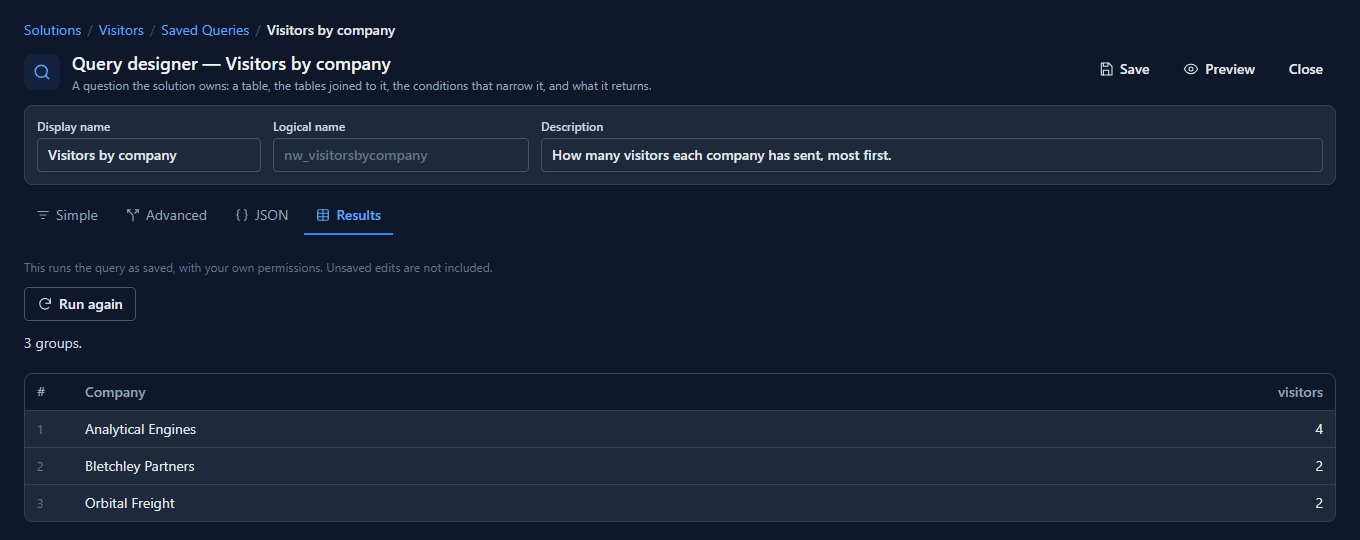
The dashboard runs it by name and gets the same three groups:
POST /environments/{environment}/saved-queries/nw_visitorsbycompany/run
{}

200 OK
{ "kind": "Groups",
  "groups": { "groupBy": ["nw_company"], "measures": ["visitors"],
    "groups": [
      { "groups": { "nw_company": "Analytical Engines" }, "measures": { "visitors": 4 } },
      { "groups": { "nw_company": "Bletchley Partners" }, "measures": { "visitors": 2 } },
      { "groups": { "nw_company": "Orbital Freight" },    "measures": { "visitors": 2 } } ] } }
The body can only narrow a saved query. Send a filter, and it's added to the saved one: meetings only, and Orbital Freight drops out because both its visitors came to deliver:
POST /environments/{environment}/saved-queries/nw_visitorsbycompany/run
{ "filter": { "connector": "And", "conditions": [{ "field": "new_purpose", "operator": "Equals", "value": 270150000 }] } }

→ Analytical Engines 3, Bletchley Partners 1
That's the point of running a query by name: when somebody improves Visitors by company in Parsware, every tool that runs it gets the improvement, and none of them can run it wider than it was designed.
And what it can't read
POST /environments/{environment}/reporting/entities/account/dataset
403  modelapps.record.forbidden  "You are not permitted to Read records of 'account'."

POST /environments/{environment}/reporting/entities/nw_visitor/dataset
{ "filter": { … "field": "nw_shoesize" … } }
400  modelapps.record.unknown_field  "Field 'nw_shoesize' is not defined on this entity."
Accounts are refused because the role doesn't read them. A saved query over accounts is refused for the same reason: running it by name doesn't get around the role.
What we fixed
Writing this turned up two things, both fixed before it was published:
- The columns didn't match the rows. A dataset that selected three columns answered with
those three in every row, and every column of the table in
columns, so a tool laying out a table fromcolumnsdrew empty ones.columnsnow followsselect. - The help page was out of date. It showed request fields the endpoint doesn't take, said no role was needed, and described a limitation that had been removed. It's rewritten, in all seven languages, with the saved-query run added.
Good to know
- Read-only, always. There's no create, update or delete here, whatever the registration holds.
- One environment per call. The environment is in the address, and nothing here reads across environments.
reporting.readormodelapps.readboth open these endpoints. Give a reporting toolreporting.read: it can't use the general record API with it.
Try it
Give a reporting registration a role that reads one table, list what it can read, then page through that table three rows at a time. Save a grouped query in Parsware and run it by name with a filter of your own.
Next: Schemas: every artifact is a file.