Parsware Platform
Relationships between tables, and what happens when you delete
Every relationship in Parsware is one-to-many, made by a lookup, and read as many-to-one from the other end. Here is how to see both directions, how to model many-to-many, and why a record that others still point at can't be deleted.
Dit artikel is alleen in het Engels beschikbaar.
In the lookups article we gave each training course a Trainer, and saw that adding the lookup also created a relationship between Contact and Training Course. This article is about relationships themselves: which kinds there are, how to read them from either table, and what happens to the linked records when one of them is deleted.
We carry on with the same Training Course and Contact tables. Every picture is the real product.
One kind of relationship, read from both ends
Parsware has one kind of relationship: one-to-many. One contact trains many courses, and each course has one trainer. The lookup field sits on the "many" side, on the course.
Many-to-one isn't a second kind. It's the same relationship read from the other end: from a course, the trainer is many-to-one. So a relationship shows up on the Relationships page of both tables. Here is Contact's:
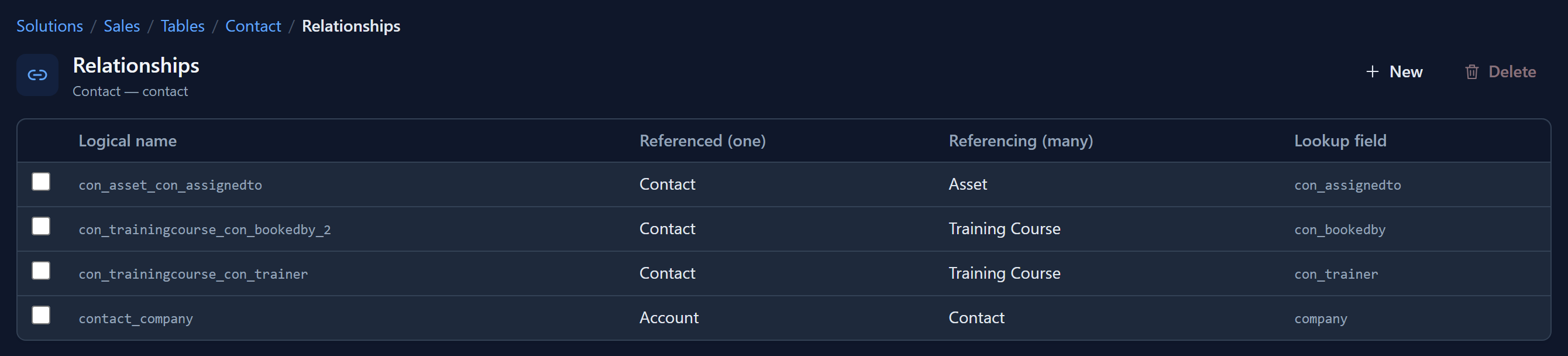
Read each row left to right, from Referenced (one) to Referencing (many):
- In the first three rows Contact is the one. A contact can have many assets assigned to them, book many courses, and train many courses.
- In the last row Contact is the many. Each contact belongs to one company, an account, through its company lookup. That's many-to-one from where we're standing.
The Lookup field column says which field carries the link. It's always on the many side, so to change a relationship you change that field.
Many-to-many: a table in the middle
A course has many attendees, and a person attends many courses. No single lookup can hold that, because a lookup holds one record. The answer is a table in the middle, with one row for each link: an Enrolment table with a Course lookup and an Attendee lookup.
This is two one-to-many relationships, and it's how the platform models its own many-to-many links. The Team Membership table in every environment is exactly this, one row for each user in each team. The table in the middle is also where the link's own details go: the date someone enrolled, whether they attended, the grade they got. A hidden join table would have nowhere to put those.
Each side then gets a Related tab for free. A course lists its enrolments, and so does a contact.
What happens on delete
A plain lookup comes with a foreign key in the database. That key decides what a delete may do, and the rule is short: you can't delete a record while other records still point at it.
Deleting from the many side is always fine. Delete a course, and its trainer is untouched. The course pointed at the contact, not the other way round.
Deleting from the one side is refused while something points at it. Riley Miller trains two courses and has two assets assigned. Select Riley in the Contacts list, choose Delete, confirm, and the delete is refused:
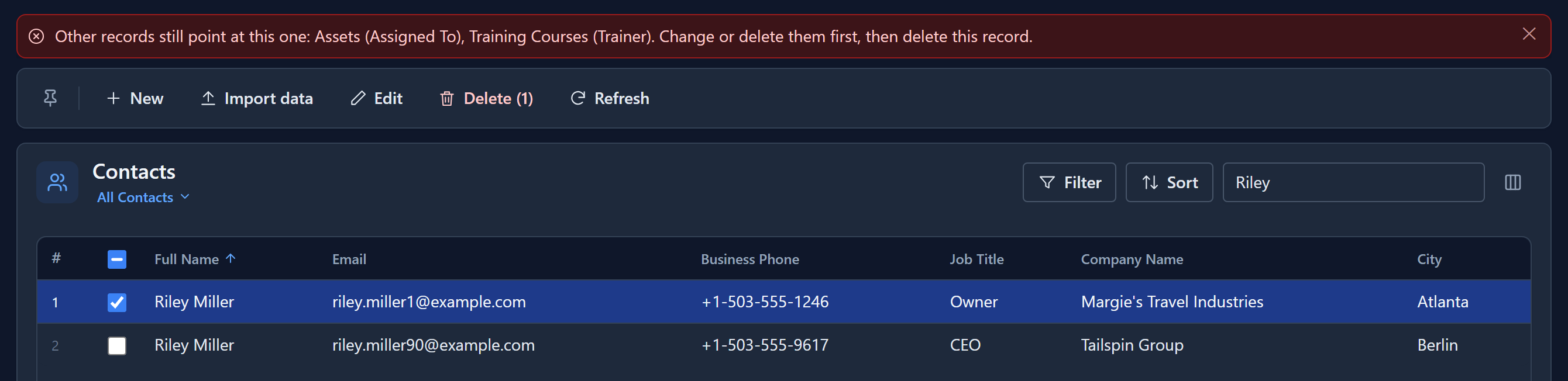
The message names every table that still points at Riley, and the lookup it points through. Riley's record is still there, and nothing else changed either: the refused delete is undone as a whole.
To go ahead, open Riley's record and use its Related tabs, which list exactly those courses and assets. Give each course another trainer and each asset to someone else, or delete them, then delete Riley.
Parsware doesn't delete the courses for you, and it doesn't quietly empty their Trainer field. Both would lose information. A course with no trainer is a question nobody asked, and it's found weeks later. There's no setting that changes this. If records should really go together, delete the related ones first, on purpose.
A lookup to several tables is different. One lookup that points at several tables can't have a foreign key, because one column can't reference two tables. So the database doesn't stop the delete. The course keeps the reference, and shows it raw instead of a name, so the gap is visible. If you need the delete to be refused, use a plain lookup.
Deleting a whole table
The same rule applies one level up. A table can't be deleted while another table has a lookup to it. Choose Delete from environment on Contact, and instead of a confirmation you get the list of what depends on it:
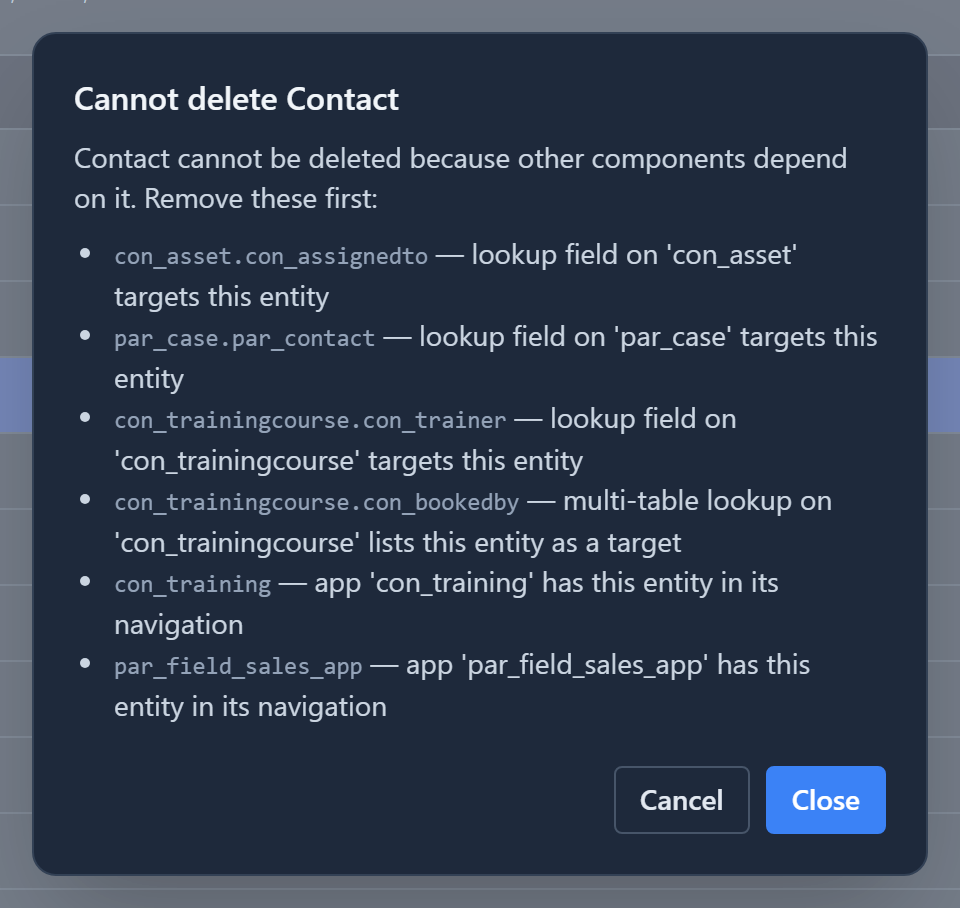
Lookups to several tables that list Contact block it too, and so do apps that show it in their navigation. Remove or change those first. Nothing is deleted until the list is empty.
In short
- Every relationship is one-to-many, made by a lookup on the "many" side. Many-to-one is the same relationship, read from the other table.
- Many-to-many is a table in the middle with two lookups, and it can hold details about each link.
- A record other records point at can't be deleted. The message names each table and lookup that still holds it. Deleting from the many side is always allowed.
- A lookup to several tables has no foreign key, so it doesn't block a delete.
- A table can't be deleted while a lookup, or an app, still depends on it.
Next: option sets, reusable choice lists with their own colours and icons.