For Power Apps
What stays on your tenant
Parsware for Power Apps runs inside your Dataverse environment. Your records are read in the browser as the signed-in user, and your designs are stored in Dataverse. The licence check makes no call. One request can leave, near a paid licence's expiry, and it carries the licence and nothing else. Here is what we measured.
Cet article n’est disponible qu’en anglais.
The short answer: your data stays in Dataverse, and so do your designs. The one thing that can ever leave your environment is the licence key you pasted in, sent back to us when it's due for renewal. This article explains where each piece runs, and what we saw when we watched.
Where Parsware runs
Everything arrives in the three managed solutions and is installed into your environment:
- The pages, the designer and the page that shows a report or a screen, are web resources. Your browser loads them from your own environment's address.
- The form controls are code components, loaded the same way.
- The licence check is a plug-in and a Custom API, running in Dataverse.
There is no Parsware server behind any of them.
Your records
Reports and screens read rows through the Dataverse Web API, from the browser, as the signed-in user. So security roles apply exactly as they do everywhere else in the app: somebody who can't see a record in a view can't see it in a report either. When a screen saves a change, it writes it the same way, as that user.
Nothing is copied out, cached elsewhere or sent to us.
Your designs
A design you're working on is a row in a Dataverse table. A published design is a web resource in one of your own solutions. Both are yours, in your environment, and both move only when you move your solutions (Move designs from Dev to Prod).
What we watched
We recorded every address the browser contacted while we opened the designer, opened a design, wrote code in the code editor, and opened a report on a form. There were two kinds:
- Our development environment itself: the pages, the code components and the Web API.
- Microsoft's own services that every Power Apps page talks to: the app shell, sign-in, Microsoft Graph and Power Apps telemetry.
Nothing went to Parsware, to a font or script service, or to anybody else. The code editor is inside the solution, and no fonts are downloaded from anywhere.
The licence check
A licence key is a signed line of text that you paste in once. Each time a Parsware page opens, the plug-in checks the signature against a public key built into it. That check makes no call to anybody, so it works the same with or without a route to the internet. See Activate your licence.
The one request that can leave
A paid licence is renewed by asking us for a fresh key. The plug-in does that itself, so there's no connector or flow for you to set up, and here is everything about it:
- When. Only for a paid licence within 30 days of its expiry date, or already past it. Never for a trial. A key with months left asks nothing.
- What. One
POSTtohttps://licensing.parsware.com/licences/renewwith an empty body. The only thing it carries is the licence key itself, the same line you pasted in. That holds your tenant ID, the IDs of the environments it covers, the plan and the dates. No user, no record and no design is sent. - After the answer, never before. The plug-in decides whether Parsware may run first, from the key and the built-in public key, and only then asks for a renewal. It waits five seconds at most, and if anything goes wrong it carries on with the key it has. After a failure it doesn't ask again for six hours.
We watched it happen, with an expired paid key in our development environment and Dataverse's plug-in tracing switched on:
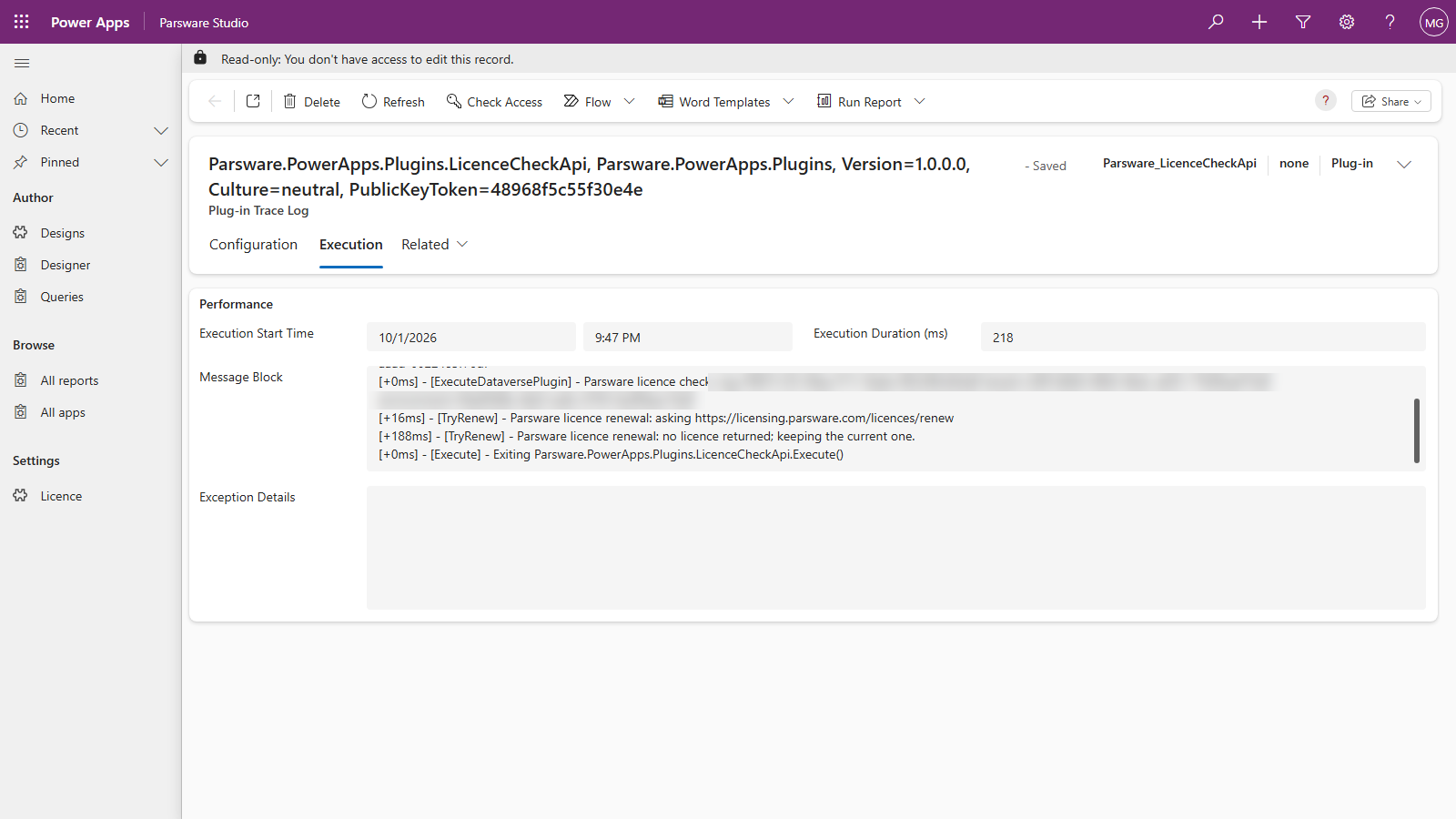
Today, that request reaches nothing. Automatic renewal isn't switched on yet, so the address doesn't answer and the plug-in keeps the key it has, as in the trace. Until it is, a key is renewed by pasting a new one over the old one.
If your environment can't reach the internet at all, nothing changes. The check doesn't need it, and a renewal that can't get out is treated the same as one that got no answer.
Not in Parsware for Power Apps
- No AI. The designer in Power Apps has no AI button yet, so nothing is sent to a model provider.
- No usage reporting. Parsware doesn't count your users, your designs or your page views, and doesn't send us any of it.
- No account. Your users never sign in to anything of ours. They use Power Apps as themselves.
Next
When a licence lapses: what keeps working when a paid licence passes its date, and what happens when a trial ends. The whole series is in the reading list.